

Most websites are still built for a human sitting in front of a screen.
That made sense for the last 20 years. A user would land on your homepage, read your hero section, click a Sign up CTA, go through onboarding, and eventually land in the dashboard. From there, the job was theirs. They had to learn the product, configure the right settings, read the docs, connect the integrations, and figure out how to get value.
That was the SaaS model. The website converted the user. The product onboarded the user. The dashboard helped the user do the work.
But agents change that flow.
An agent doesn’t care about your color gradient. It doesn’t need your carousel of customer logos. It doesn’t want to click through five onboarding screens to understand what your product does. It wants to know whether your product can help complete the user’s task, what surface it should use, what instructions matter, and what it should avoid.
That means your website now needs another interface.
Not a separate website like Netlify did with https://netlify.ai. Not an ugly “AI version” of your homepage. The same product, but exposed through a different surface.
For humans, the surface is visual. For agents, the surface is text + operational.
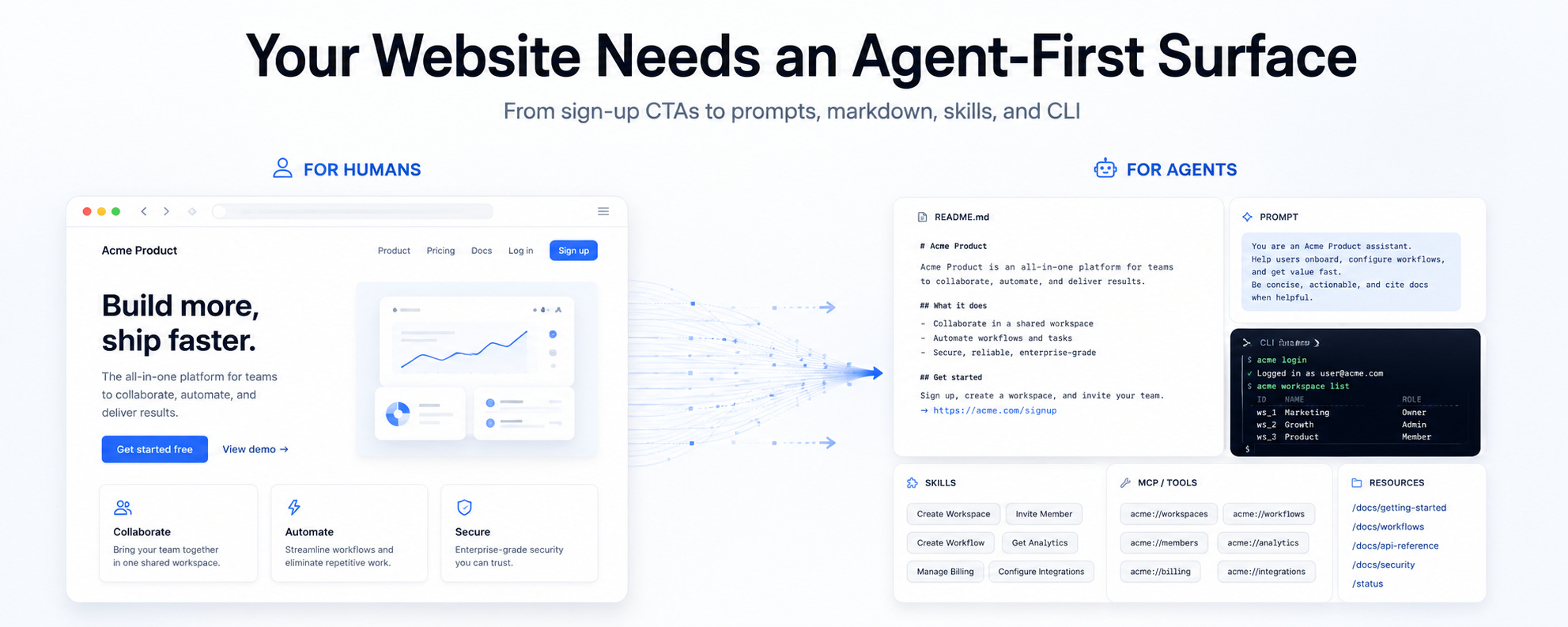
The Old CTA Was “Sign Up”
The default SaaS CTA has always been some version of “Start for free” or “Sign up” (Or signup, I never know when to use one or the other).
Those CTAs assume the person clicking is the one who will operate the product. They assume the user wants to create an account, learn the dashboard, configure the product, and then do the work inside the app.
If a developer is using Claude Code, Codex, or any other agentic coding environment, “Sign up” is often not the most useful next step. The user doesn’t want to manually learn your docs from scratch. They want to pull your product into the workflow they are already running with an agent.
So the new CTA becomes Build with agents.
Build with agents should enable the user to either quickly copy a prompt to start using your product by using an existing CLI or Skills. It should also enable your users to customize their prompt by understanding more of your existing features and let them pick what they want to use.
The prompt should also do more than install a package. It should help the agent detect the project, choose the right integration path, modify the right files, warn about deprecated patterns, and print verification steps at the end.
The new CTA sends your product context into the agent.
Your Visual Website Is Not Enough
Humans need websites because humans need visual context. We need layout, hierarchy, product screenshots, pricing pages, testimonials, and CTAs. That is how we evaluate products.
Agents need something else. They need clean, machine-readable context. They need to understand what the product does, when to use it, which workflows are supported, which integrations exist, and what action to take next. They do not need your nav bar, footer, animation, cookie banner, or 50 repeated pricing-card labels. This is why markdown versions of your website and docs matter.
A human browser can request HTML and get the visual page. When an agent requests a webpage, it’ll be clear in its user agent that it’s an AI Agent and it’ll be clear in its accept header that it prefers content/markdown.
The human browser sends something like:
http
User-Agent: Chrome
Accept: text/html
The agent sends something like:
http
User-Agent: Claude Code
Accept: text/markdown
So the server returns markdown.
The idea is not to create a second web. The idea is to expose the same content in a representation that fits the visitor. Humans get visual UI. Agents get machine-readable markdown.
Markdown for Agents Is Not Stripped-Down HTML
This is the part most teams will miss. A markdown page for an agent should not just be your website converted to plain text. That helps a little, but it is not enough.
A human-facing page explains the product. An agent-facing page should explain how to use the product correctly. Those are different jobs.
A human docs page might have step by step instructions:
1. Install the SDK.
2. Add the provider.
3. Configure your API key.
4. Run your app.
That is useful for a person. But an agent needs more than a sequence of steps. It needs product judgment.
The markdown version should also explain which package to use for new apps, which package is deprecated, which APIs should be avoided, what common mistakes happen, how to detect the user’s framework, where secrets should never be placed, and how to verify the implementation before responding.
That is the difference between documentation and agent instructions. Humans read docs to understand. Agents read docs to act.
If your docs don’t encode judgment, the agent will pattern-match from whatever it finds online. That might include old docs, outdated StackOverflow answers, random GitHub issues, deprecated blog posts, and half-correct examples. You don’t want the internet to be the agent’s source of truth for your product. You want your product to be the source of truth.
Docs Need to Become More Opinionated
Most docs try to be neutral. They show all the options and let the user decide. That works for a human who is learning. It works less well for an agent that is trying to complete a task.
Agents need defaults. They need to know the recommended path. They need to know what is deprecated, what is dangerous, what only applies to legacy projects, and what good output looks like.
This doesn’t mean your docs should become bloated. It means they should include the decision-making context that a good human expert would have.
A good agent-readable docs page should include sections like:
markdown
## Recommended path

Use this approach for all new projects.

## Deprecated

Do not use this unless maintaining an old project.

## Avoid

These patterns work, but usually cause problems later.

## Verify before responding

Check these files. Run these commands. Confirm these outputs.

## Common mistakes

If you see this error, it usually means this.
This is not just extra documentation. It is product taste encoded into text. A lot of agent failures will not happen because the model is dumb. They will happen because the product did not expose enough context for the agent to choose the right path.
Some agents will use your docs. Others will use the skills you create. It’ll depend on how your user’s agent is set up. Make sure you also create public skills people can use with the same important information you add in your docs.
Your CLI and MCP are Also an Agent Surface
Before agents, CLIs were mostly developer productivity tools. Now they are becoming execution surfaces for agents.
This matters because agents are much better at running a clear command than they are at clicking through a complicated UI. If your product has a CLI or an MCP, the agent can use it to initialize projects, configure integrations, validate setup, and perform repeatable actions.
But the CLI needs to be designed with agents in mind. A good agent-friendly CLI should have clear commands, predictable outputs, useful errors, and verification steps. It should explain what changed. It should print what to do next. It should avoid interactive flows that only make sense for a human sitting at a terminal.
The CLI should not only help humans move faster. It should help agents complete work safely.
Publish Your Agent Surfaces on the Web
Here’s another mistake I see many companies making: they will create skills, CLIs, and MCPs, but hide them in GitHub repos or deep docs pages.
That will limit adoption.
If agents need to discover these surfaces, they need to be published and indexed. Humans also need to understand that these surfaces exist.
Your website should have clear public pages for your agent-facing assets:
- Your CLI
- Your skills
- Your MCP server
- Your markdown docs
- Your agent prompts
- Your `llms.txt`
Each page should explain what the surface is for, when to use it, how to install it, what problem it solves, what commands or prompts to start with, and what agents should avoid.
This is partly documentation. It is also marketing. Agent discoverability is not the same as GEO. GEO gets you mentioned. Agent readiness gets you used.
If an agent can find your product but cannot understand how to use it, you are not agent-ready. If it understands your product but cannot call tools, install skills, run commands, or verify success, you are still not agent-ready.
The Website Is Becoming a Product Interface Again
For the last decade, the marketing website was mostly a conversion surface. Get traffic. Explain product. Drive signup. Send users into the app.
In an agent-first world, the website becomes more than that. It becomes an interface that agents use to understand what your product can do and how to use it on behalf of a human.
That means the website becomes part marketing, part docs, part developer experience, and part product infrastructure.
This is especially important for dev tools, but I don’t think it will stop there. Developer tools are just the window to the future because developers adopt these patterns first. Eventually, every product that wants to be used by agents will need some version of this.
The question changes from “Can a human understand our website?” to “Can an agent use our website to get the user’s job done?”
1000%! that's why we've built our LLM optimizer - https://salespeak.ai/control. Ready for agents.
This is awesome Gonto! Question, do you know are there any methods/tools allowing you to identify agent traffic, vs. human traffic, agent signup vs. human signup, agent API key creation vs. human API key creation, or even deep usage behaviors?